Managing Respond connections
Respond connections determine whether Respond rules can execute response actions for an organization. If a Respond connection is inactive or broken, automated response actions cannot run for that organization.
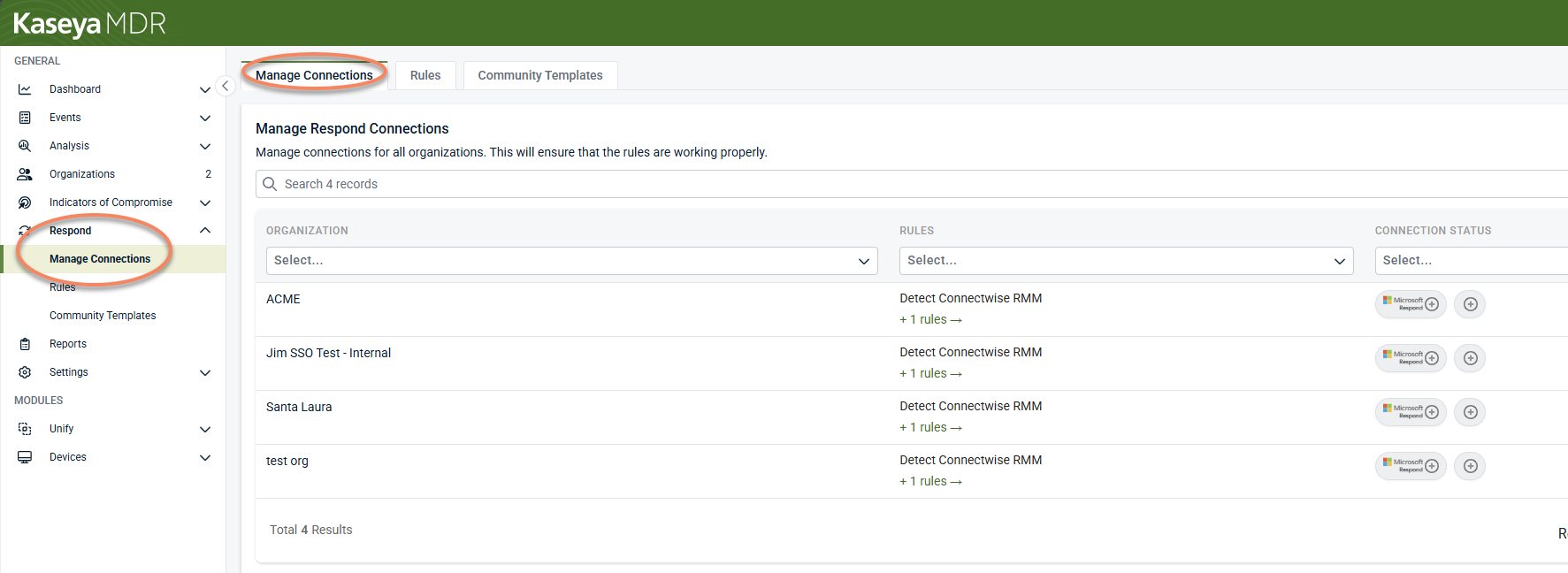
Use the Manage Connections page in the Respond module to review connection status across organizations and take action when a connection requires attention.
Connection requirements
Respond connections require authentication using an administrator account with sufficient permissions for the customer domain.
Authentication is required when:
-
Connecting an organization for the first time
-
Fixing a broken Respond connection
-
Upgrading an existing connection to grant additional permissions
Managing connections
From the Manage Connections view, you can:
-
Review Respond connection status across organizations
-
Identify inactive or broken connections
-
Select Connect or Fix Connections to restore access
-
Confirm which organizations are able to run Respond actions
When you select Connect or Fix Connections, you are prompted to authenticate using a global administrator account for the target organization.
The page supports:
-
Searching and sorting by organization, and viewing associated rules
-
Exporting connection status to CSV or PDF
-
Viewing which Respond rules apply to an organization by selecting the + [number] rules link
Connection status
Each organization has one of the following Respond connection states:
-
Active: The Respond connection is established and the application is being monitored by Respond rules. Response actions can run when rule conditions are met.
-
New: The connection is not yet established and the application is not being monitored by Respond rules. The connection must be authenticated before response actions are available.
-
Upgradable: The connection is active, but additional permissions are available. Upgrading the connection allows Respond to access expanded response capabilities.
-
Broken: The connection is inactive and Respond rules cannot execute response actions for the organization. Detection and alerting may still occur, but remediation will fail until the connection is restored.
-
The Manage Connections view makes it easier to verify that Respond is able to act on behalf of each organization and to identify issues that could prevent response actions from running as expected.
Relationship to Respond rules
-
Respond rules can still generate alerts without an active connection, but actions require a healthy Respond connection.
-
Respond connections affect response execution only.
-
Respond rules can evaluate events and generate alerts even when a Respond connection is not active.
-
Response actions require a healthy Respond connection for the affected organization.
If a rule triggers but remediation does not occur, the first step should be to verify the organization’s Respond connection status.
Related articles
-
Using the Respond module: Introduces the Respond module and explains how Respond rules, templates, connections, and actions fit together before rules are created or automated
-
Creating Respond rules: Walks through how to build Respond rules that correlate multiple signals into higher‑confidence alerts, including rule structure, scope, conditions, schedules, and response outcomes
-
Respond actions: Describes common response actions that may be available when a Respond rule triggers and explains how to use them safely, including when alert‑only behavior is appropriate


