API access and webhook governance
Kaseya MDR includes API and webhook capabilities that allow the platform to be accessed by, or to send data to, external systems only where explicitly configured. To protect against unauthorized access and data transmission, API usage and outbound webhook communication are governed through explicit policy acceptance, credential management, and approved domain allowlisting.
Use this article to understand:
-
How API access is enabled and governed
-
How outbound webhook destinations are restricted through approved domains
-
Where API and webhook security boundaries are configured
This article focuses on administrative governance and access control. It does not describe alert detection behavior, webhook payloads, API endpoints, subscription management, event schemas, or SOC workflows.
Settings surfaces
API and webhook governance settings are managed from the Settings experience in Kaseya MDR. Access these controls from Settings > API.
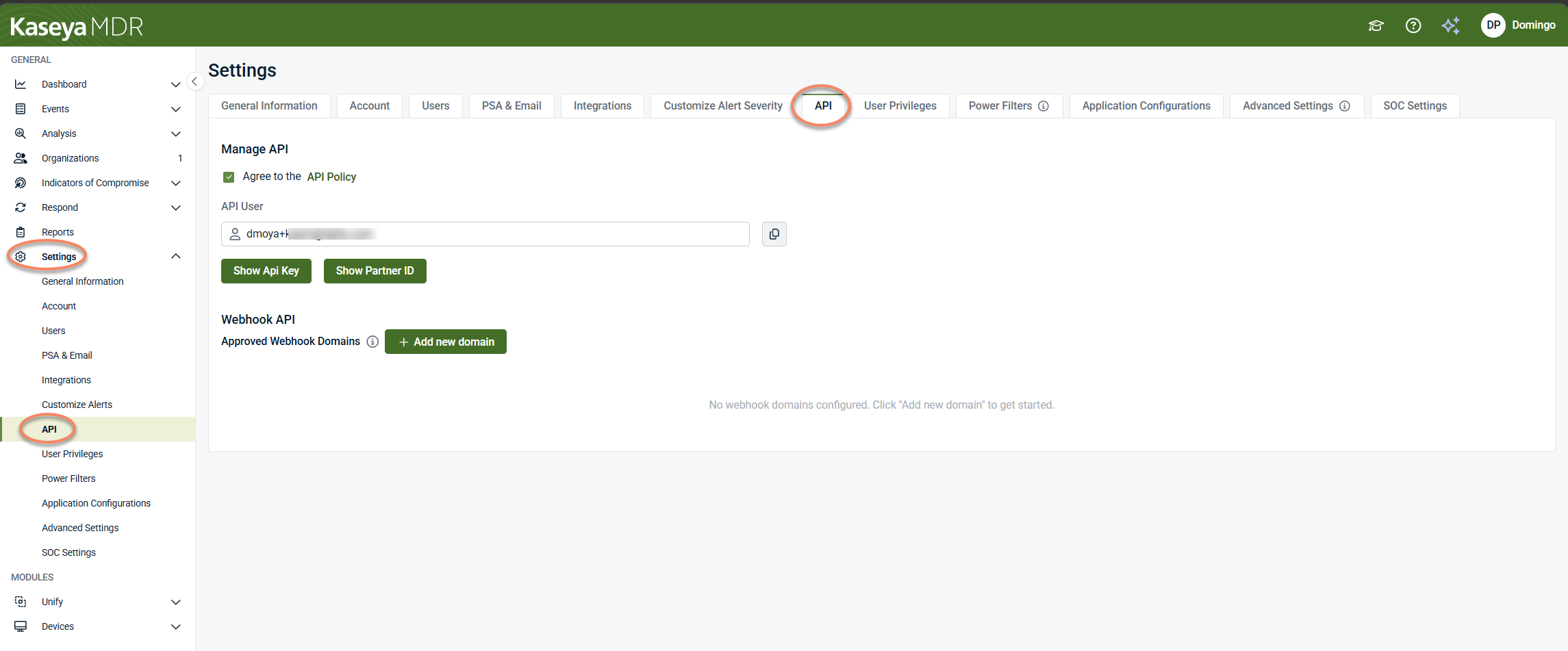
This area centralizes configuration related to:
-
API policy acceptance
-
API identity and credential visibility
-
Webhook destination governance
Administrative configuration in Kaseya MDR is centralized under Settings, where access and governance boundaries are defined and enforced.
API and webhooks: concept overview
APIs and webhooks support different integration models:
-
APIs are typically used to query the platform and retrieve data on demand.
-
Webhooks are typically used to send data to an external endpoint when activity occurs.
Kaseya MDR exposes governance controls for both APIs and webhooks under Settings > API. These controls define whether API features are enabled and where outbound webhook communication is allowed. They do not define what data is sent, how often it is sent, which events generate webhook messages, or how external systems process the data.
NOTE API and webhook capabilities are product‑specific. The Settings > API page provides governance controls such as policy acceptance, credential visibility, and destination allowlisting.
API policy and identity management
From Settings > API, the Manage API section controls whether API access is enabled for your account. Before using any API‑related or webhook features, you must explicitly accept the API Policy by selecting the Agree to the API Policy checkbox.
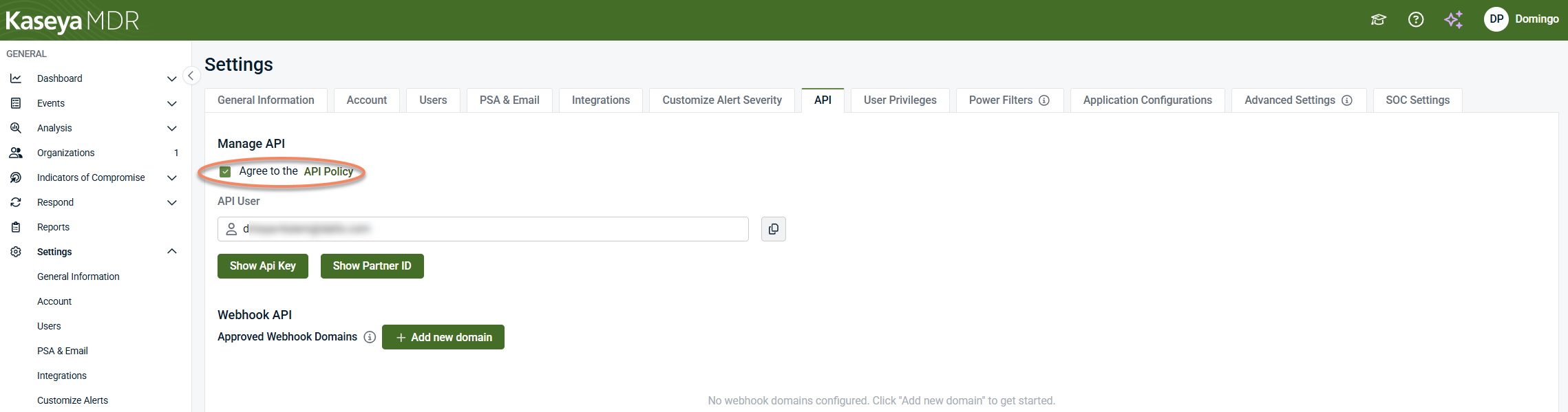
When the API Policy is accepted:
-
An API user identity is created for the account.
-
API credentials become available for viewing.
-
Webhook governance settings can be configured.
Until the API Policy is accepted, API‑related features—including webhook configuration—are not enabled.
API user and credentials
Once API access is enabled, Kaseya MDR provides a system‑generated API user that represents your account when interacting with API‑based features.
From the Manage API section, administrators can:
-
View the API user identity
-
Generate and display the API key (one time)
-
Display the Partner ID associated with the account
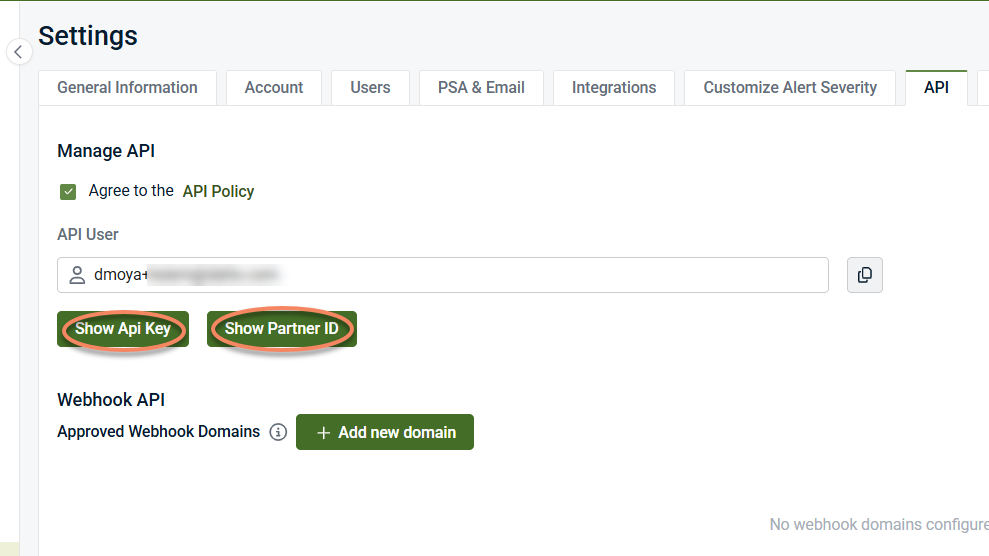
These values are used to authenticate API‑based communication where applicable.
Generating and viewing the API key
Selecting Show API Key generates an API key and displays it once in the user interface.
-
The API key is visible only at the time it is generated.
-
After navigating away or refreshing the page, the key is no longer displayed.
-
Previously generated API keys are not stored or redisplayed.
Because of this:
-
Copy the API key immediately if required.
-
Store the key securely according to your organization’s credential‑management practices.
-
If the key is lost, generate a new one.
IMPORTANT Availability of an API key does not imply that all API features are enabled or supported. API capabilities, endpoints, and behaviors are product‑specific and documented separately where applicable.
Partner ID visibility
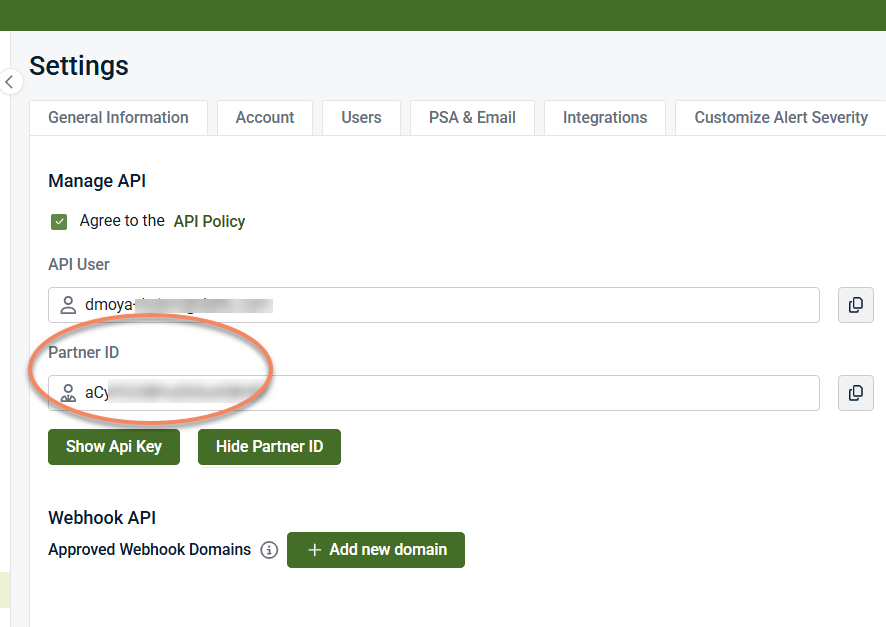
Selecting Show Partner ID displays the Partner ID associated with the account.
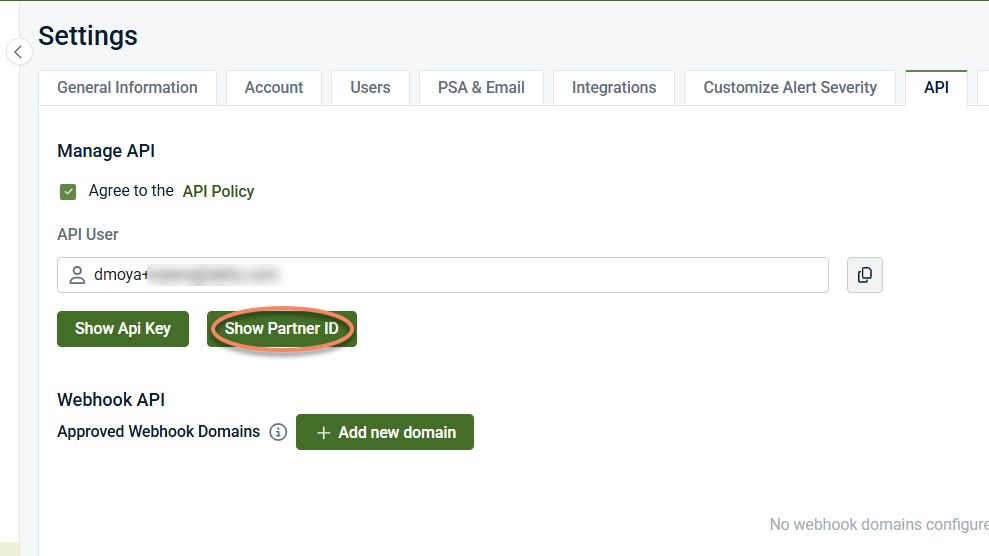
The Partner ID:
-
Uniquely identifies your partner account in API‑related interactions
-
May be required by external systems to associate API activity with the correct tenant
-
Is used for identification purposes rather than authentication
Unlike the API key:
-
The Partner ID is not secret.
-
It does not grant access on its own.
-
It does not need to be rotated or regenerated.
Selecting Hide Partner ID removes the Partner ID value from view in the user interface. This action affects visibility only and does not change or invalidate the Partner ID.
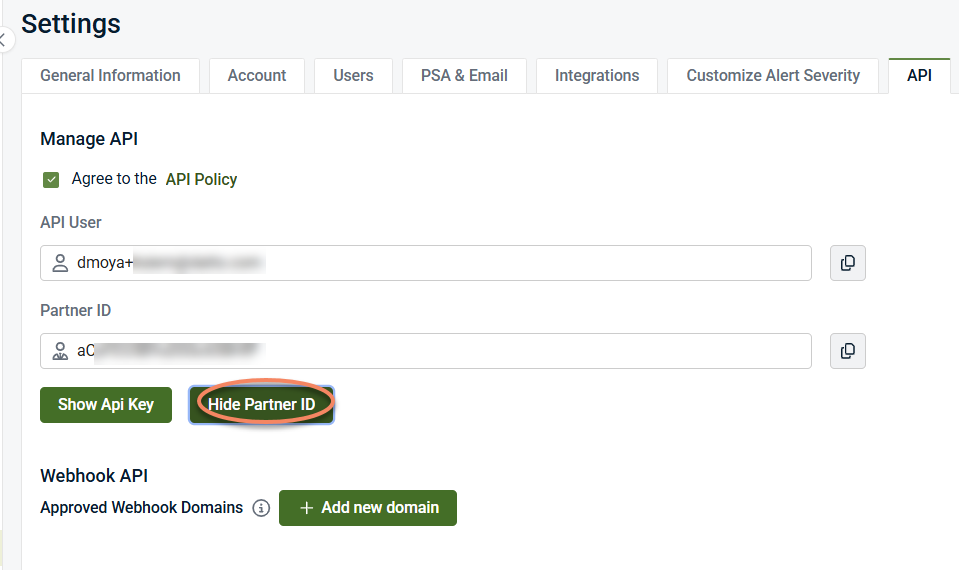
The Partner ID can be viewed again at any time from Settings > API.
Webhook API: approved domains
Kaseya MDR uses an approved domain allowlist to control where outbound webhook-based communication is permitted.
Only webhook endpoints hosted on domains included in the Approved Webhook Domains list are allowed to receive outbound webhook communication from the platform.
This mechanism:
-
Defines where webhook data can be sent
-
Acts as a security boundary for outbound communication
-
Applies regardless of user role or organization‑level configuration
Adding an approved webhook domain
To allow webhook communication to an external system, you must first approve the destination domain.
-
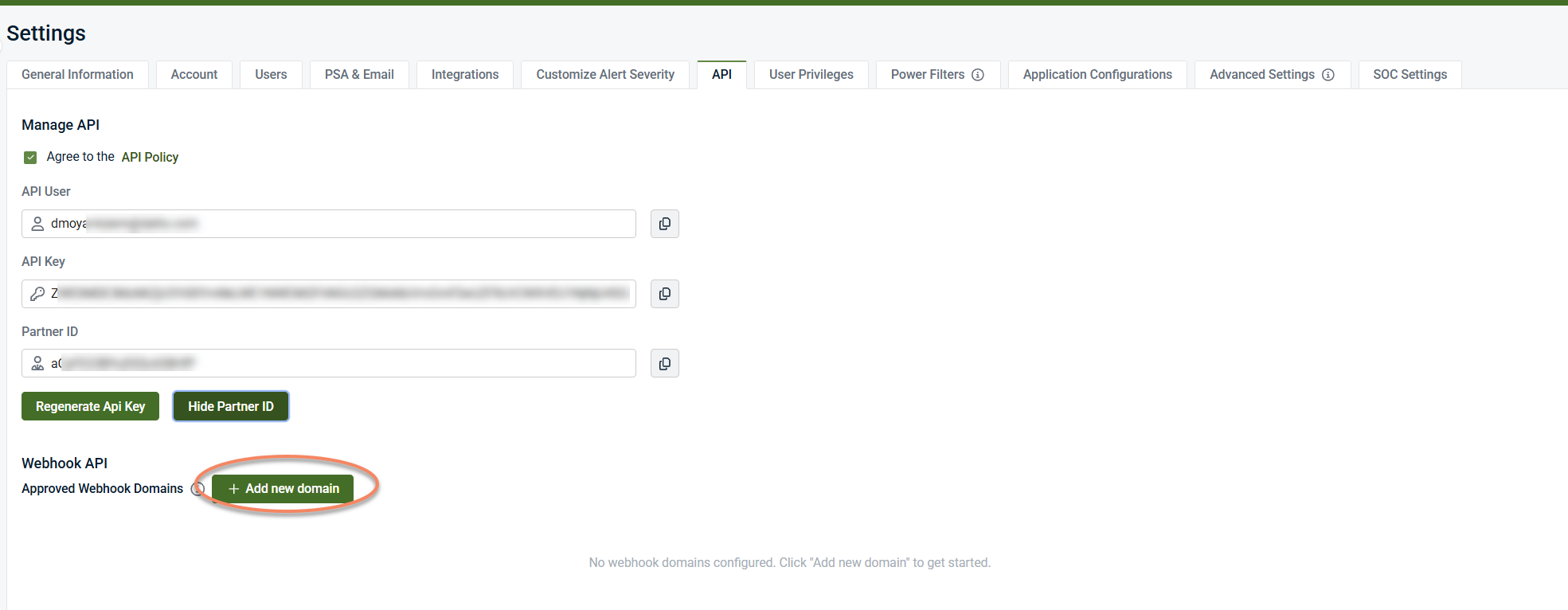
Open Settings > API.
-
Locate the Webhook API section
-
Select + Add new domain
-
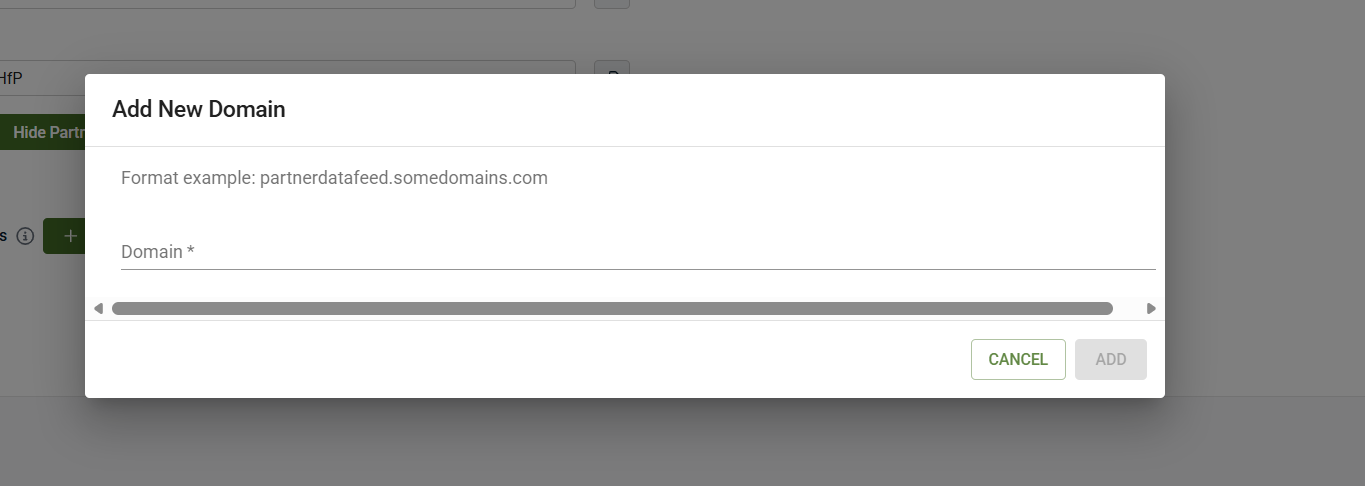
Enter the domain that will host the webhook endpoint (for example, partnerdatafeed.example.com).
-
Click Add to save the domain and add it to the approved allowlist.
Once added, webhook endpoints hosted on that domain are permitted as destinations for outbound webhook communication.
NOTE Approving a domain allows it as a destination only. It does not create webhook subscriptions, define payload structures, or initiate data delivery.
What these settings control (and what they do not)
These settings control:
-
Whether API access is enabled via policy acceptance
-
The API identity and credential visibility for the account
-
Which external domains are permitted as webhook destinations
-
Outbound API and webhook security boundaries
These settings do not
-
Configure alert generation or detection logic
-
Define webhook subscriptions or event types
-
Document webhook payloads or schemas
-
Control email notifications or PSA ticketing
-
Affect SOC investigation or response behavior
Relationship to other governance settings
API and webhook governance is one of several independent administrative control areas in Kaseya MDR:
-
Notifications, PSA, and external communications define how alerts are delivered.
-
API access and webhook governance defines whether API access is enabled and where outbound webhook communication is allowed.
-
Configuring SOC settings defines how the SOC is authorized to act and communicate.
These controls are intentionally separated to keep security boundaries explicit and auditable.
Relationship to SaaS Alerts APIs
Some Kaseya products, such as SaaS Alerts, expose developer‑oriented APIs and webhook subscriptions intended for event streaming and custom integrations.
Kaseya MDR exposes governance controls only for API access and webhook destinations. API endpoints, webhook subscriptions, payload formats, and streaming behavior are product‑specific and documented separately where applicable.
Governance guidance
When managing API and webhook access:
-
Accept the API Policy only when API usage is required
-
Treat API keys as sensitive credentials and rotate them according to your internal security practices
-
Approve only domains you own or explicitly trust
-
Review approved webhook domains periodically and remove those no longer required
Webhook and API settings should be treated as security controls, not integration workflows.
Summary
In Kaseya MDR, API access and webhook behavior are governed through explicit policy acceptance and approved webhook domains configured under Settings > API. These settings define whether API access and outbound webhook communication are allowed, not what data is sent or which events trigger delivery. Integration details, payloads, and endpoints are documented separately where applicable.
Related articles
-
Notifications, PSA, and external communications: Explains how alerts generated by Kaseya MDR are delivered to external systems and recipients, including PSA ticket creation and email notifications
-
Configuring SOC settings: Describes how SOC communication preferences, organization‑specific context, maintenance windows, and authorization boundaries are defined
-
Data retention and governance: Explains how Kaseya MDR retains and manages data from a governance and compliance perspective, including retention periods and searchable data availability


